
Pro AV Catalog


Broadcast2Post | Podcast by Key Code Media
The latest episode of the Broadcast2Post Podcast explores how creative teams can design smarter, scalable media asset management (MAM) workflows that actually work for their people, not against them.
Michael Kammes is joined by Key Code Media’s Mike Cavanagh, Bryson Jones of Northshore Automation, and Jeremy Strootmen of Iconik to unpack how AI-powered tagging, cloud collaboration, and workflow automation are changing the way teams organize and deliver content.
Here’s the reality. The average employee spends 1.8 hours per day searching for files. Editors lose 1.5 to 2 hours daily relinking or rebuilding projects. Marketing teams waste seven hours a week recreating assets that already exist. These inefficiencies add up to lost productivity, higher storage costs, and frustrated creative staff.
Whether your team is drowning in shared drives or ready to connect multiple production systems, this episode helps you identify what matters most: people, process, and platforms that scale with your workflow.
Key Considerations Before You Build a Media Asset Management System
Before selecting a MAM platform, take the time to align your team on goals, workflows, and long-term needs. This checklist will help you define what success looks like before diving into demos or RFPs.
1) Define the Business Problem (Not Just the Tech)
- Why now? Is the pain about search, approvals, compliance, or scaling?
- Who benefits: marketing, post-production, or external partners?
- What is the measurable business value: time saved, risk reduced, or new revenue potential?
2) Inventory & Audit Existing Media
- Where does content live today: shared drives, NAS/SAN, cloud, or external drives?
- How much content exists, in what formats, and what is its condition?
- Identify duplicates or outdated files that should not migrate.
3) Metadata & Taxonomy Planning
- What search terms matter most: project, client, campaign, rights, or product?
- Will you use controlled vocabularies (dropdowns) or free text?
- Plan for AI and machine learning tagging but still define core human-governed fields.
- Assign ownership for ongoing taxonomy updates.
4) Workflow Mapping
- Define ingest sources: camera cards, agency deliveries, live feeds.
- Map integrations with edit tools like Premiere, Resolve, or Avid.
- Centralize review and approval to replace email and chat threads.
- Plan distribution paths: OTT, social, broadcast, or internal comms.
5) User Roles & Access Needs
- Define internal roles: editors, producers, designers, and marketers.
- Outline what needs strict security versus what can be shared.
- Forecast how user counts may grow over the next few years.
6) Rights Management & Compliance
- Track licensing expirations and regional usage restrictions.
- Enforce brand compliance by surfacing approved versions only.
- Maintain an audit trail for who accessed, modified, or downloaded assets.
7) Budget & Ownership
- Factor total cost: software licenses, storage, integration, and support.
- Decide who will administer and maintain the system day-to-day.
- Budget for metadata entry, growth, renewals, and upgrades.
8) Culture & Adoption Prep
- Secure leadership buy-in for standardized workflows.
- Commit to user training, especially for creative staff wary of extra clicks.
- Prepare teams for change management: no more saving files on desktops.
Media Asset Management Starter Bundles
At Key Code Media, we design and integrate media asset management systems for production teams, broadcasters, schools, and creative departments nationwide. Whether you need to organize existing footage, connect hybrid teams, or automate delivery, our engineers build end-to-end workflows that save time and scale with your content goals.
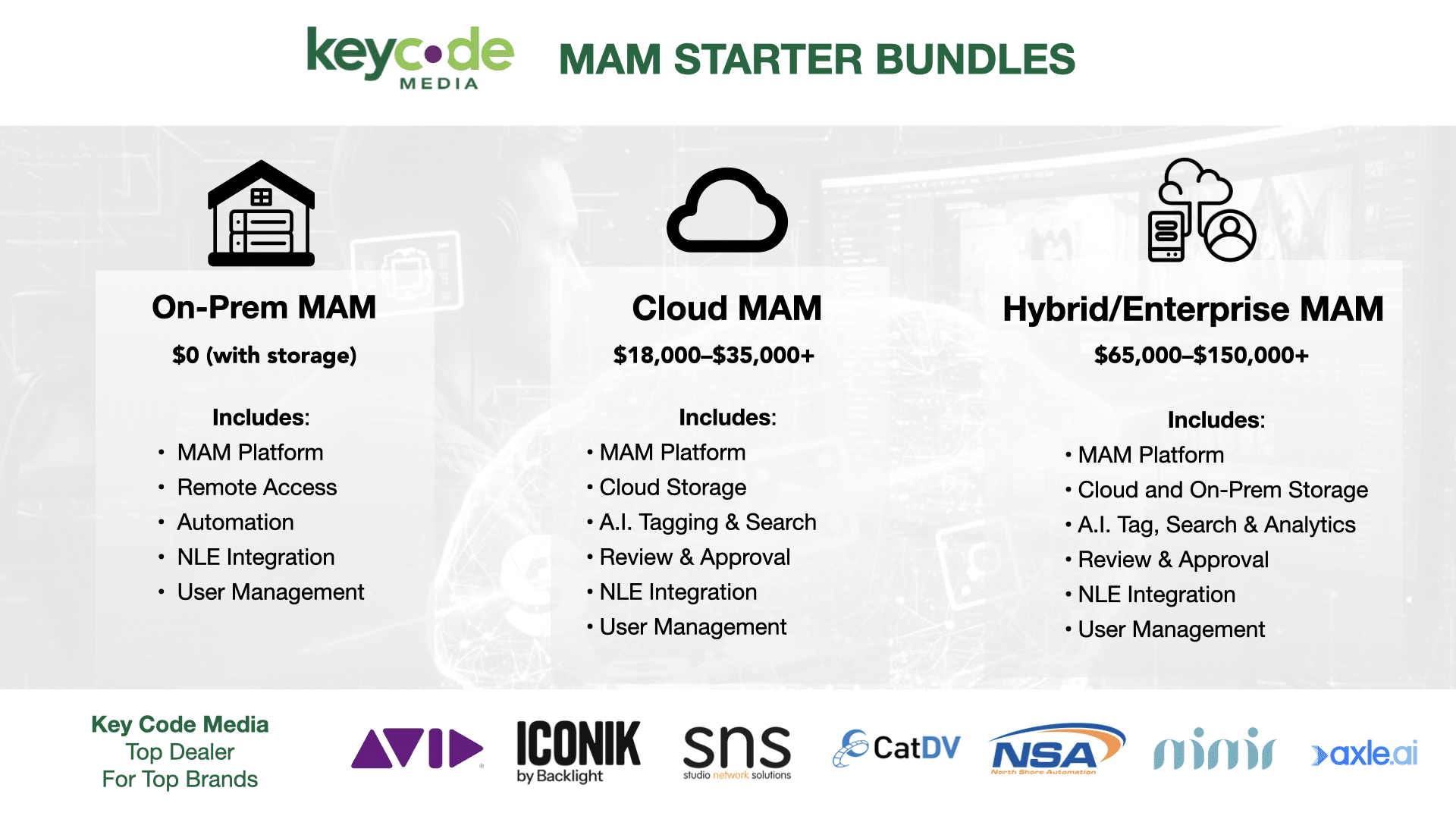
To make planning easier, we’ve created a few MAM Starter Bundles to guide your next step:
- Our Free On-Prem MAM Bundle, powered by SNS EVO, combines shared storage, Slingshot MAM, and remote editing tools for small to mid-size post teams starting around $15,000 to $25,000. It’s a turnkey system that covers storage, management, and automation in one affordable package.
- The Cloud MAM Bundle, using Iconik or CatDV Cloud Edition, provides AI tagging, browser-based review, and integration with Adobe Creative Cloud for distributed teams. Pricing typically ranges from $18,000 to $35,000 annually, depending on user count and storage needs.
- And for larger creative operations, our Hybrid Enterprise MAM Bundle connects on-prem storage with cloud-based collaboration, automation, and analytics using platforms like Avid MediaCentral or EditShare FLOW. Enterprise systems start around $65,000 and scale upward based on capacity and integrations.
Next Steps
Contact Key Code Media to schedule a free Media Asset Management consultation. Our team will help you define your requirements, choose the right platform, and build a workflow that works from day one.
201A Ann Street
Oakmont, PA 15139
USA
(724) 337-1685
www.texolve.com